Finova Analytics Dashboard: A Fresh Take on Financial Design
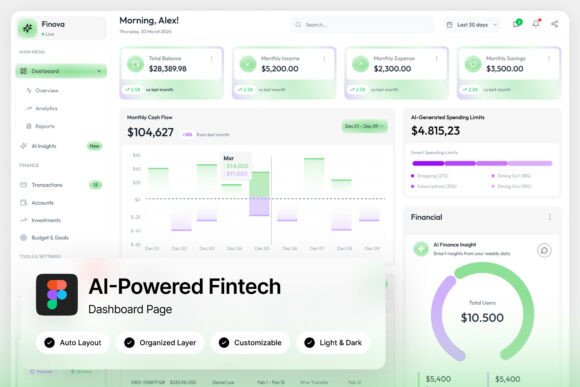
The Finova Analytics Dashboard is a sleek, AI-powered fintech UI designed for personal finance and neobank applications. With its clean green-and-white palette, intuitive layout, and modern aesthetic, it offers a refreshing alternative to traditional financial dashboards. Whether you're a designer, developer, or fintech startup founder, Finova provides a foundation for creating engaging, user-friendly financial tools.
At its core, the dashboard features wallet balances, spending analytics, income tracking, and transaction lists, all presented with clarity and purpose. The use of circular progress indicators adds visual interest without overwhelming the user. This combination of functionality and design makes Finova ideal for mobile-first SaaS teams, digital banking designers, and fintech startups looking to build compelling financial interfaces.
Why Finova Stands Out
What sets Finova apart is its focus on simplicity and usability. The light-themed design ensures readability across devices, while the pixel-perfect layout and well-organized layers make it easy to customize. The inclusion of both light and dark mode interfaces adds versatility, allowing users to adapt the dashboard to different environments and preferences.
Designed with a resolution of 1440×1024 px, Finova is optimized for desktop and tablet use, making it a great choice for web-based financial applications. Its unique, stylish look helps brands stand out in a competitive market, while the fully customizable nature means you can tailor it to fit your specific needs.
Applications for Different Users
Finova is more than just a static template—it's a flexible tool that can be adapted for various use cases. For fintech startups, it serves as a starting point for building intuitive financial apps that help users manage their money more effectively. For digital banking designers, it offers a modern framework to experiment with new layouts and interactions.
Mobile-first SaaS teams can leverage Finova to create responsive financial dashboards that work seamlessly across platforms. The included Figma file and help guide make it easy to edit and refine the design, while the free Google Fonts ensure a polished look without additional costs.
Creative Possibilities with Finova
One of the most exciting aspects of Finova is its potential for creative interpretation. Designers can experiment with different color schemes, typography choices, and layout variations to match their brand identity. The clean structure allows for easy integration of custom illustrations, icons, or animations that enhance the user experience.
For example, a personal finance app could use Finova as a base and add interactive charts or real-time data updates to provide deeper insights into user spending habits. A neobank might incorporate Finova’s design elements into a broader suite of tools, creating a cohesive and visually appealing ecosystem for customers.
Practical Tips for Using Finova
To get the most out of Finova, start by identifying your target audience and use case. If you're building a dashboard for individual users, prioritize clarity and ease of navigation. For business-focused applications, consider adding features like team collaboration tools or advanced reporting options.
Keep the design consistent by using the provided font links and layer organization. This ensures that your final product looks professional and polished. Also, test the dashboard on different screen sizes to ensure it remains functional and visually appealing across devices.
How to Customize Finova for Your Needs
Customizing Finova is straightforward thanks to its well-structured Figma file. You can easily adjust colors, fonts, and layout elements to match your brand’s visual identity. The named and grouped layers make it simple to locate and modify specific components without disrupting the overall design.
For developers, the pixel-perfect layout provides a solid foundation for coding the interface. By following the structure and design principles of Finova, you can ensure a smooth transition from design to development. Additionally, the help guide included in the download offers step-by-step instructions for making changes and troubleshooting issues.
Real-World Use Cases
Finova can be used in a variety of real-world scenarios. A budgeting app might use its spending analytics feature to help users track expenses and set financial goals. A mobile banking app could integrate Finova’s wallet balance display to give users a clear overview of their accounts.
For educational purposes, Finova can serve as a learning tool for designers and developers looking to understand best practices in financial UI design. It also provides a practical example of how to balance aesthetics with functionality, making it a valuable resource for students and professionals alike.
Maximizing the Value of Finova
To maximize the value of Finova, focus on user experience and accessibility. Ensure that the dashboard is easy to navigate and that key information is clearly presented. Avoid clutter by using whitespace effectively and prioritizing essential features.
Consider the long-term maintenance of your project. By using a well-organized and customizable design like Finova, you can make future updates and improvements more efficient. This approach not only saves time but also ensures that your financial application remains relevant and useful over time.
Final Thoughts
The Finova Analytics Dashboard is a powerful tool for anyone involved in financial design. Its clean, modern aesthetic, combined with practical features and customization options, makes it an excellent choice for fintech startups, digital banking teams, and mobile-first SaaS projects. Whether you're looking to build a personal finance app or enhance an existing financial platform, Finova provides a solid foundation for creating engaging, user-friendly experiences.