Podaco Keynote Template: Streamline Your Presentation Workflow
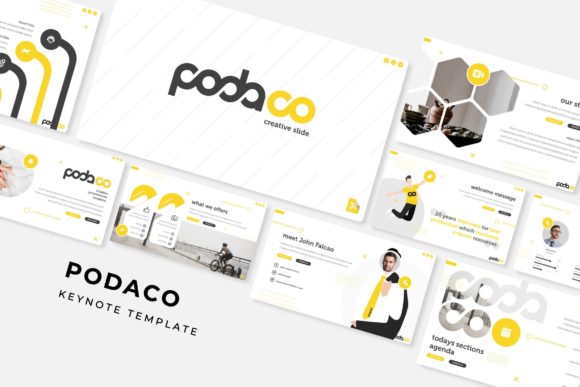
The Podaco Keynote Template is a powerful tool designed to enhance the presentation creation process for professionals, educators, and creative individuals. Whether you're preparing for a business pitch, academic lecture, or creative showcase, this template offers a structured yet flexible approach to building visually compelling slides. With 150 total slides across five premade color variations, it supports a wide range of use cases and ensures consistency in design while allowing for personalization.
Understanding the Podaco Keynote Template
The Podaco Keynote Template is more than just a collection of slides—it's a comprehensive framework that simplifies the planning and execution of presentations. It fits into the broader workflow of content development, from initial brainstorming to final delivery. By providing a ready-made structure, it helps users focus on the message rather than the mechanics of slide design.
This template is particularly useful when time is limited or when a consistent visual identity is required across multiple presentations. It serves as a foundation upon which users can build, ensuring that each slide aligns with the overall theme and purpose of the presentation.
Key Features of the Podaco Keynote Template
The Podaco Keynote Template includes several features that make it ideal for both beginners and experienced presenters. These include:
- Five Premade Color Variations: Each template comes in five distinct color schemes, allowing users to match their brand or personal style without the need for extensive customization.
- 30 Slides per Template: With 30 slides in each of the five variations, the template provides enough content to cover most presentation needs while maintaining a clear structure.
- Handcrafted Infographic Elements: The inclusion of professionally designed infographics makes it easy to convey complex information in a visually engaging way.
- Section Break Slides: These slides help organize content into logical sections, improving navigation and flow during the presentation.
- Gallery and Portfolio Slides: Ideal for showcasing projects, work samples, or data-driven insights, these slides provide a clean and professional layout.
Additionally, the template includes resizable and editable graphic placeholders, making it easy to add images, charts, or other visual elements. The drag-and-drop functionality ensures that users can rearrange content quickly without compromising the design integrity.
Integration with Other Tools and Resources
The Podaco Keynote Template is designed to work seamlessly with other tools and resources commonly used in the presentation creation process. For instance, it can be paired with graphic design software like Adobe Illustrator or Canva for custom visuals. It also integrates well with project management platforms such as Trello or Asana, where users can plan their presentation content before importing it into the template.
For those who rely on specific fonts, the template includes a free font download link, ensuring that the typography remains consistent and professional. This feature is especially valuable for users who want to maintain a cohesive brand identity across all materials.
The template’s compatibility with both standard and widescreen formats adds to its versatility. Whether presenting on a traditional projector or a modern digital display, the slides will scale appropriately, ensuring clarity and impact.
Practical Use Cases and Workflow Examples
The Podaco Keynote Template can be used at various stages of a project or task. For example, during the planning phase, it can serve as a storyboard to outline key points and visual elements. During execution, it provides a structured format for organizing content and ensuring a logical flow. After the project is complete, it can be used to document lessons learned or share results with stakeholders.
Consider a marketing team preparing a product launch presentation. They could start by using the template to outline the core message, target audience, and key selling points. As they gather data and visuals, they can populate the relevant slides, using the gallery and portfolio templates to showcase product designs or customer testimonials. The section break slides help separate different parts of the presentation, such as market analysis, strategy, and implementation plan.
Another example is an educator creating a lecture series. The template allows them to structure each session with clear headings, supporting visuals, and interactive elements. The handcrafted infographics can be used to explain complex concepts, while the customizable slides ensure that each lecture maintains a consistent look and feel.
Implementation Tips and Best Practices
To get the most out of the Podaco Keynote Template, consider the following tips:
- Plan Ahead: Before opening the template, outline your presentation’s main points and structure. This will help you navigate the slides more efficiently and avoid unnecessary changes later.
- Customize Thoughtfully: While the template provides a solid foundation, don’t hesitate to modify it to suit your specific needs. Adjust colors, fonts, and layouts to reflect your brand or personal style.
- Use the Section Break Slides Strategically: These slides are ideal for separating major topics or phases of your presentation. Use them to guide the audience through the content and maintain a clear narrative.
- Optimize Visuals: Ensure that any images or graphics you add are high-resolution and relevant to the content. Avoid cluttering slides with too much text or visual elements.
By following these best practices, users can maximize the template’s potential and create presentations that are both professional and engaging.
Long-Term Use and Maintenance
The Podaco Keynote Template is not just a one-time solution—it’s a resource that can be reused and updated over time. For businesses or individuals who frequently create presentations, having a reliable template can save significant time and effort. It also ensures that all materials maintain a consistent look and feel, reinforcing brand recognition.
To keep the template effective over the long term, users should periodically review and update the content. This includes adding new slides, revising existing ones, and incorporating feedback from audiences or stakeholders. By treating the template as a living document, users can adapt it to evolving needs and trends.
Additionally, the template’s compatibility with different file formats and devices makes it easy to share and collaborate. Whether working alone or with a team, the Podaco Keynote Template supports a smooth and efficient workflow.